

Download Memory Cleaner Free – Clean Memory – Memory Cleaner, Free Memory Cleaner, Clean Memory, Optimize RAM, Free Up RAM, RAM Optimization Tool, System Performance, PC Optimization, Memory Management, Windows Utility
Overview
Memory Cleaner Free – Clean Memory is a lightweight utility developed by Jason A. Bilbrey, designed to enhance system performance on Windows platforms. The app targets users who experience slowdowns due to memory congestion, particularly gamers, developers, and multitaskers who rely on consistent responsiveness. By focusing on RAM optimization, it addresses a common pain point in computing: the gradual degradation of performance as background processes accumulate. The application aims to free up unused RAM and improve system efficiency through a simple, one-click solution.
Real-world use cases include clearing memory during intense gaming sessions, preparing a development environment for compilation tasks, or resolving sluggishness after prolonged use. Its ability to provide an instant speed boost makes it a practical tool for users seeking immediate relief from system lag. The app fits within the broader productivity and system utility ecosystem, offering a focused alternative to more complex optimization suites. While the developer did not provide additional technical details about the underlying algorithms or memory management techniques, the core functionality remains clear: to optimize RAM usage and maintain system responsiveness.
As a free tool, it lowers the barrier to entry for users seeking performance improvements without financial commitment. Its minimal footprint and non-intrusive operation further support its role as a reliable utility in daily computing workflows.
Key Features & Functionality
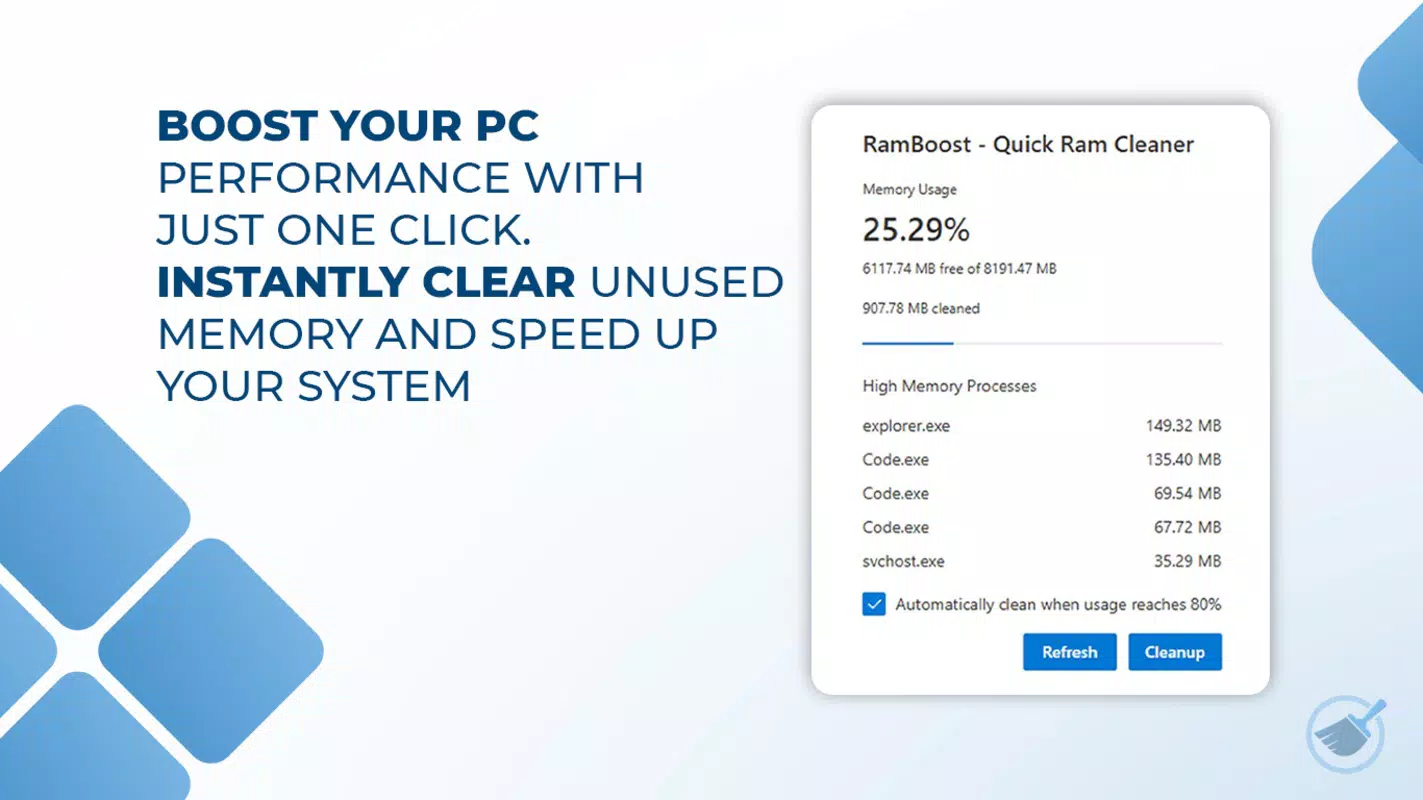
- Instant Speed Boost: With a single click, the app rapidly frees up unused RAM, delivering immediate performance improvements. This is especially beneficial during high-demand tasks like gaming or video editing, where responsiveness is critical.
- Automatic Optimization: Users can configure the tool to run cleanups automatically via real-time monitoring or scheduled tasks. This reduces the need for manual intervention, making it ideal for users who want a hands-off approach to system maintenance.
- Transparent Resource Monitoring: The app includes live graphs for RAM and CPU usage, allowing users to visualize system performance in real time. This feature supports informed decision-making by revealing which processes are consuming resources.
- Minimal Footprint: Operating quietly in the system tray, Memory Cleaner Free does not interfere with ongoing tasks. Its lightweight design ensures it consumes minimal system resources, avoiding the performance drain often associated with optimization tools.
- Intuitive Design: The user interface is straightforward and accessible to all skill levels. Whether a casual user or a power user, navigating the app’s features is effortless, contributing to a frictionless experience.
These features collectively serve users who prioritize system responsiveness and efficiency. For example, a developer compiling code can use the instant boost to clear memory before starting a build, while a gamer can activate a cleanup before launching a resource-intensive title.
Interface, UX & Performance
The interface of Memory Cleaner Free – Clean Memory is clean and minimal, designed around ease of use. The main window presents essential controls and real-time performance graphs, allowing users to monitor RAM and CPU usage without distraction. Navigation is straightforward, with a primary button for instant cleanup and secondary settings for automation and monitoring preferences.
Although the developer did not list formal performance metrics, the app’s lightweight nature suggests it operates efficiently across a range of Windows devices. Its minimal footprint ensures it runs smoothly on systems with limited resources, maintaining responsiveness even during heavy usage. The tool integrates seamlessly into the system tray, minimizing visual clutter and avoiding disruptions to workflow.
Users can expect consistent performance across different device categories, from entry-level laptops to high-end desktops. The app does not display ads or intrusive notifications, contributing to a stable and focused user experience. While specific stability data was not provided, its design philosophy emphasizes reliability and non-intrusiveness, which supports long-term usability.
Platform Compatibility & Technical Requirements
Memory Cleaner Free – Clean Memory is designed for the Windows platform. It is compatible with current and recent versions of Windows operating systems, though specific OS requirements were not listed. The app has a file size of 1.2 MB, making it highly efficient in terms of storage usage.
The software version is 1.0.2, indicating a stable initial release. As a free application, it does not require a purchase or subscription. The developer did not specify minimum hardware requirements or additional dependencies, suggesting it is optimized for broad compatibility across various Windows devices.
Users should ensure their system meets general Windows requirements for running lightweight utilities. The app’s small size and low resource consumption indicate it is suitable for both older and newer machines.
Pros and Cons
Pros
- Lightweight design with minimal system impact
- Free to download and use with no hidden costs
- One-click instant speed boost for immediate performance gains
- Automatic cleanup options reduce manual effort
- Real-time monitoring provides transparency into system usage
Cons
- Specific OS compatibility details were not disclosed
- Advanced customization options were not mentioned
- No in-app updates or changelog information provided
- Developer did not list technical specifications or resource usage metrics
- Compatibility with older Windows versions remains unclear
FAQ
Is Memory Cleaner Free – Clean Memory safe to use?
The app is designed to free up unused RAM without affecting active processes. As a lightweight utility developed by Jason A. Bilbrey, it operates in the system tray and does not install intrusive components. However, users should only download the app from official sources to ensure security.
Can I use this tool on older Windows versions?
While the app is built for Windows, specific compatibility with older versions was not disclosed. It is recommended to verify system requirements before installation.
Does the app require an internet connection?
There is no indication that the app requires an internet connection for core functionality. It operates locally to manage RAM and system performance.
How often should I run the memory cleanup?
Users can run the cleanup manually as needed or enable automatic optimization. The frequency depends on individual usage patterns and system load.
Is there a paid version with more features?
As of now, the app is offered as a free tool. The developer did not announce any premium tier or additional features in a paid version.
Final Thoughts
Memory Cleaner Free – Clean Memory delivers a focused, efficient solution for users seeking to optimize RAM and improve system responsiveness. Its lightweight design, intuitive interface, and instant performance boost make it a valuable tool for gamers, developers, and everyday users alike. While detailed technical specifications are limited, the app’s core functionality is clear and effective.
For those looking to free up RAM, reduce lag, and maintain smooth performance without the complexity of full system optimizers, this utility offers a practical and accessible option. It stands out in the productivity category for its simplicity and reliability.
Download Memory Cleaner Free – Clean Memory now


